Session
Current day inquiry
Reasoning
HIGH
Context
23103/82188 (28%)
Temperature
0.8
Conversation Thread
IDLE
Zuza [google/gemma-4-12b-qat]
Zuza [google/gemma-4-12b-qat]
Completed
Thinking
The user wants to know the current day.
I have access to a `time` sense which provides the current local time, date, and weekday.
Plan:
1. Read the current time from the `time` sense.
2. Formulate a response to the user stating the current day.
Since I have the information directly in the `available_senses`, I can answer this immediately. However, the instructions for the first pass say: "choose exactly one of these: answer directly if no tools are needed; or publish an initial plan...".
Wait, the `light_context` suggests using `python_console` to get the day accurately, but I already have it in `available_senses`. Using the sense is more direct.
Let's check the `time` sense:
`local_date`: "2026-06-18"
`weekday`: "Thursday"
I can answer directly.
Wait, the prompt says "Choose exactly one of these: answer directly if no tools are needed; or publish an initial plan...".
I'll answer directly.
Today is Thursday.
USER // 2026-06-18 14:32
Can you screenshot a main page of wikiperdia and send it to me?
Zuza [google/gemma-4-12b-qat]
Zuza [google/gemma-4-12b-qat]
Completed
Thinking
The user wants a screenshot of the Wikipedia main page.
I have the `playwright_browser` tool for navigation and `screenshot_capture` for taking the screenshot.
I also have the `web_browsing` skill which provides a framework for using the browser.
Plan:
1. Use `playwright_browser` to navigate to `https://www.wikipedia.org`.
2. Wait for the page to load and settle.
3. Use `screenshot_capture` to take a screenshot of the page.
4. Provide the file URL of the screenshot to the user.
I need to check if I have the `playwright_browser` and `screenshot_capture` tool contracts.
Looking at `available_tools`:
- `playwright_browser`: Automate live websites with a real browser.
- `screenshot_capture`: Capture local desktop screenshots into the workspace.
Wait, `screenshot_capture` is for *local desktop* screenshots. If I want to take a screenshot of a *browser page* specifically via Playwright, I should check if `playwright_browser` has a screenshot capability.
Usually, `playwright_browser` tools in these environments have a `screenshot` operation.
However, I don't see the full contract for `playwright_browser` yet. The `selected_tool_instructions` is null.
I should publish the plan and then the runtime will load the contracts.
Steps:
1. Navigate to Wikipedia using `playwright_browser`.
2. Capture the screenshot using `screenshot_capture` (or via `playwright_browser` if the contract allows, but I'll assume `screenshot_capture` for now unless the contract says otherwise). Actually, `screenshot_capture` might capture the whole desktop. If the browser is in windowed mode, it might work. Or I can check the `playwright_browser` capabilities once loaded.
3. Send the result.
Let's refine the plan:
Step 1: Navigate to Wikipedia.
Step 2: Capture screenshot.
Step 3: Final response.
I'll start by publishing the plan.
Wait, the `light_context` already selected `playwright_browser` and `screenshot_capture`.
The `selected_skill_instructions` for `web_browsing` is loaded.
I will create the plan now.
Zuza [google/gemma-4-12b-qat]
Completed
Thinking
The user wants a screenshot of the Wikipedia main page.
I have a plan:
1. Navigate to Wikipedia using `playwright_browser`.
2. Capture a screenshot using `screenshot_capture`.
3. Provide the screenshot URL to the user.
Current state:
- `playwright_browser` instruction is loaded in `selected_tool_instructions`.
- `web_browsing` skill is loaded in `selected_skill_instructions`.
- The plan is already set.
Next action: Execute the first step of the plan, which is navigating to Wikipedia.
Tool call details:
- `tool_name`: `playwright_browser`
- `tool_arguments`:
- `operations`: `[{"action": "goto", "url": "https://www.wikipedia.org"}]`
- `headless`: `false` (as per instructions to prefer visible mode)
- `session_id`: "wikipedia_screenshot_session" (arbitrary but consistent)
I will call `playwright_browser` now.
Tool: playwright_browser
Input
{
  "session_id": "wikipedia_screenshot_session",
  "headless": false,
  "operations": [
    {
      "action": "goto",
      "url": "https://www.wikipedia.org"
    },
    {
      "action": "get_page_state",
      "max_chars": 1200
    }
  ]
}
Output
{
  "ok": true,
  "tool": "playwright_browser",
  "session_id": "wikipedia_screenshot_session",
  "headless": false,
  "session_dir": "artifacts/playwright/sessions/wikipedia_screenshot_session",
  "results": [
    {
      "index": 1,
      "action": "goto",
      "ok": true,
      "navigated": true,
      "tab_index": 0,
      "url": "https://www.wikipedia.org/",
      "title": "Wikipedia"
    },
    {
      "index": 2,
      "action": "get_page_state",
      "ok": true,
      "page_state": {
        "url": "https://www.wikipedia.org/",
        "title": "Wikipedia",
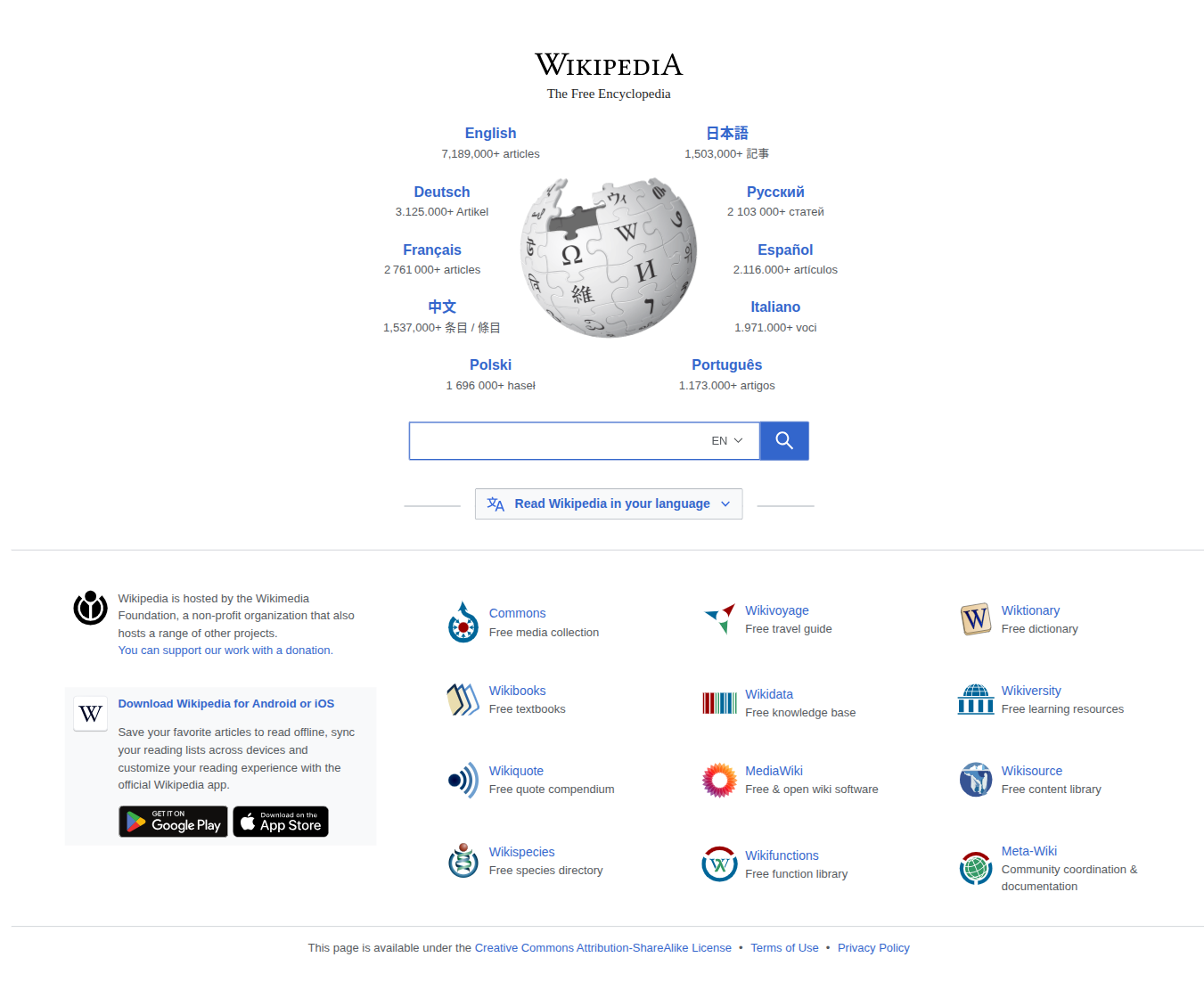
        "text_excerpt": "Wikipedia The Free Encyclopedia Wikipedia English 7,189,000+ articles 日本語 1,503,000+ 記事 articles 記事 Deutsch 3.125.000+ Artikel Русский 2 103 000+ статей Artikel статей Français 2 761 000+ articles Español 2.116.000+ artículos artículos 中文 1,537,000+ 条目 / 條目 Italiano 1.971.000+ voci 条目 / 條目 voci Polski 1 696 000+ haseł Português 1.173.000+ artigos haseł artigos Search Wikipedia Search EN Read Wikipedia in your language Read Wikipedia in your language Wikipedia is hosted by the Wikimedia Foundation, a non-profit organization that also hosts a range of other projects. Commons Free media collection Wikivoyage Free travel guide Wiktionary Free dictionary Wikivoyage Wiktionary Commons Free travel guide Free dictionary Free media collection You can support our work with a donation. You can support our work with a donation. Wikibooks Free textbooks Wikidata Free knowledge base Wikiversity Free learning resources Wikibooks Wikiversity Wikidata",
        "viewport_text_excerpt": "Wikipedia The Free Encyclopedia Wikipedia English 7,189,000+ articles 日本語 1,503,000+ 記事 articles 記事 Deutsch 3.125.000+ Artikel Русский 2 103 000+ статей Artikel статей Français 2 761 000+ articles Español 2.116.000+ artículos artículos 中文 1,537,000+ 条目 / 條目 Italiano 1.971.000+ voci 条目 / 條目 voci Polski 1 696 000+ haseł Português 1.173.000+ artigos haseł artigos Search Wikipedia Search EN Read Wikipedia in your language Read Wikipedia in your language Wikipedia is hosted by the Wikimedia Foundation, a non-profit organization that also hosts a range of other projects. Commons Free media collection Wikivoyage Free travel guide Wiktionary Free dictionary Wikivoyage Wiktionary Commons Free travel guide Free dictionary Free media collection You can support our work with a donation. You can support our work with a donation. Wikibooks Free textbooks Wikidata Free knowledge base Wikiversity Free learning resources Wikibooks Wikiversity Wikidata",
        "full_text_excerpt": "Wikipedia The Free Encyclopedia English 7,189,000+ articles 日本語 1,503,000+ 記事 Deutsch 3.125.000+ Artikel Русский 2 103 000+ статей Français 2 761 000+ articles Español 2.116.000+ artículos 中文 1,537,000+ 条目 / 條目 Italiano 1.971.000+ voci Polski 1 696 000+ haseł Português 1.173.000+ artigos Search Wikipedia EN Afrikaans Shqip العربية Asturianu Azərbaycanca Български 閩南語 / Bân-lâm-gú বাংলা Беларуская Català Čeština Cymraeg Dansk Deutsch Eesti Ελληνικά English Español Esperanto Euskara فارسی Français Galego 한국어 Hausa Հայերեն हिन्दी Hrvatski Bahasa Indonesia Italiano עברית ქართული Ladin Latina Latviešu Lietuvių Magyar Македонски Malagasy मराठी مصرى Bahasa Melayu Bahaso Minangkabau မြန်မာဘာသာ Nederlands 日本語 Norsk (bokmål) Norsk (nynorsk) Нохчийн Oʻzbekcha / Ўзбекча Polski Português Қазақша / Qazaqşa / قازاقشا Română Simple English Sinugboanong Binisaya Slovenčina Slovenščina Српски / Srpski Srpskohrvatski / Српскохрватски Suomi Svenska Kiswahili தமிழ் Татарча / Tatarça తెలుగు ภาษาไทย Тоҷикӣ تۆرکجه Türkçe Українська اردو Tiế...
Zuza [google/gemma-4-12b-qat]
Completed
Thinking
The user wants a screenshot of the Wikipedia main page.
I have already successfully navigated to Wikipedia using `playwright_browser` in the previous step.
The current plan is:
1. Navigate to Wikipedia (Completed)
2. Capture Screenshot (Next step)
3. Provide Screenshot (Final step)
I have the `playwright_browser` tool loaded and used successfully.
The next action is to capture the screenshot.
Looking at the `playwright_browser` tool instructions, I can use the `screenshot` action within the `operations` list.
Wait, the plan says to use `screenshot_capture`. Let me check the `available_tools`.
`screenshot_capture` is available.
However, `playwright_browser` also has a `screenshot` action and it's already open in a session.
The `playwright_browser` documentation says: "Capture screenshots to the workspace." and "Screenshot files are returned as workspace image artifacts."
The `screenshot_capture` tool description is "Capture local desktop screenshots into the workspace."
Since I'm already using `playwright_browser` and it's a browser-specific action, using its `screenshot` action is more direct and appropriate for a "screenshot of a main page of wikipedia". `screenshot_capture` would capture the whole desktop.
I will update the plan to use `playwright_browser`'s `screenshot` action for step S2 to maintain consistency with the current session.
Actually, I'll just proceed with the current plan's intent but I'll use `playwright_browser` for the screenshot since it's already in the session and provides the specific content. Or I can stick to the tool `screenshot_capture` if that's what the plan says, but `playwright_browser` is better.
The plan step S2 says "Use screenshot_capture".
Let's look at `screenshot_capture` details... it's not fully expanded in the packet but usually it's for the desktop.
If I use `playwright_browser` for the screenshot, I stay in the same tool.
I'll use `playwright_browser` with the `screenshot` operation.
Wait, the plan is:
S1: Navigate to Wikipedia (Done)
S2: Capture Screenshot (Planned: `screenshot_capture`)
S3: Provide Screenshot
I will update S2 to use `playwright_browser` because it's more precise for a "screenshot of a main page" than a desktop capture.
Actually, I'll check if I can just call `playwright_browser` with `screenshot`.
The tool `playwright_browser` is already loaded and its instructions are in `selected_tool_instructions`.
I can call it now.
Plan update:
Change S2 tools from `screenshot_capture` to `playwright_browser`.
Wait, the current plan has `screenshot_capture` for S2. I'll just call `playwright_browser` and see if I can do it in one go or if I should stick to the plan.
Actually, for a high-quality result, `playwright_browser`'s `screenshot` is the way to go.
Let's refine the plan.
S1: Navigate to Wikipedia (Completed)
S2: Capture Screenshot (In progress - will use `playwright_browser`)
S3: Provide Screenshot
I'll call `playwright_browser` with `screenshot` action.
One detail: `playwright_browser` `screenshot` action takes a `path` (optional, usually it returns a ref) and `full_page` (boolean).
I'll use `full_page: true` to make sure the whole page is captured.
Wait, I'll stick to the `playwright_browser` tool since it's already active.
Step S2: Capture Screenshot.
Tool: `playwright_browser`
Operation: `screenshot` with `full_page: true`.
I will execute this now.
Tool: playwright_browser
Input
{
  "session_id": "wikipedia_screenshot_session",
  "headless": false,
  "operations": [
    {
      "action": "screenshot",
      "full_page": true
    }
  ]
}
Output
{
  "ok": true,
  "tool": "playwright_browser",
  "session_id": "wikipedia_screenshot_session",
  "headless": false,
  "session_dir": "artifacts/playwright/sessions/wikipedia_screenshot_session",
  "results": [
    {
      "index": 1,
      "action": "screenshot",
      "ok": true,
      "screenshot_path": "artifacts/playwright/sessions/wikipedia_screenshot_session/screenshots/call_0002_step_01_screenshot.png",
      "tab_index": 0,
      "url": "https://www.wikipedia.org/",
      "title": "Wikipedia"
    }
  ],
  "current_page": {
    "tab_index": 0,
    "url": "https://www.wikipedia.org/",
    "title": "Wikipedia",
    "text_excerpt": "Wikipedia The Free Encyclopedia Wikipedia English 7,189,000+ articles 日本語 1,503,000+ 記事 articles 記事 Deutsch 3.125.000+ Artikel Русский 2 103 000+ статей Artikel статей Français 2 761 000+ articles Español 2.116.000+ artículos artículos 中文 1,537,000+ 条目 / 條目 Italiano 1.971.000+ voci 条目 / 條目 voci Polski 1 696 000+ haseł Português 1.173.000+ artigos haseł artigos Search Wikipedia Search EN Read Wikipedia in your language Read Wikipedia in your language Wikipedia is hosted by the Wikimedia Foundation, a non-profit organization that also hosts a range of other projects. Commons Free media collection Wikivoyage Free travel guide Wiktionary Free dictionary Wikivoyage Wiktionary Commons Free travel guide Free dictionary Free media collection You can support our work with a donation. You can support our work with a donation. Wikibooks Free textbooks Wikidata Free knowledge base Wikiversity Free learning resources Wikibooks Wikiversity Wikidata",
    "viewport_text_excerpt": "Wikipedia The Free Encyclopedia Wikipedia English 7,189,000+ articles 日本語 1,503,000+ 記事 articles 記事 Deutsch 3.125.000+ Artikel Русский 2 103 000+ статей Artikel статей Français 2 761 000+ articles Español 2.116.000+ artículos artículos 中文 1,537,000+ 条目 / 條目 Italiano 1.971.000+ voci 条目 / 條目 voci Polski 1 696 000+ haseł Português 1.173.000+ artigos haseł artigos Search Wikipedia Search EN Read Wikipedia in your language Read Wikipedia in your language Wikipedia is hosted by the Wikimedia Foundation, a non-profit organization that also hosts a range of other projects. Commons Free media collection Wikivoyage Free travel guide Wiktionary Free dictionary Wikivoyage Wiktionary Commons Free travel guide Free dictionary Free media collection You can support our work with a donation. You can support our work with a donation. Wikibooks Free textbooks Wikidata Free knowledge base Wikiversity Free learning resources Wikibooks Wikiversity Wikidata",
    "full_text_excerpt": "Wikipedia The Free Encyclopedia English 7,189,000+ articles 日本語 1,503,000+ 記事 Deutsch 3.125.000+ Artikel Русский 2 103 000+ статей Français 2 761 000+ articles Español 2.116.000+ artículos 中文 1,537,000+ 条目 / 條目 Italiano 1.971.000+ voci Polski 1 696 000+ haseł Português 1.173.000+ artigos Search Wikipedia EN Afrikaans Shqip العربية Asturianu Azərbaycanca Български 閩南語 / Bân-lâm-gú বাংলা Беларуская Català Čeština Cymraeg Dansk Deutsch Eesti Ελληνικά English Español Esperanto Euskara فارسی Français Galego 한국어 Hausa Հայերեն हिन्दी Hrvatski Bahasa Indonesia Italiano עברית ქართული Ladin Latina Latviešu Lietuvių Magyar Македонски Malagasy मराठी مصرى Bahasa Melayu Bahaso Minangkabau မြန်မာဘာသာ Nederlands 日本語 Norsk (bokmål) Norsk (nynorsk) Нохчийн Oʻzbekcha / Ўзбекча Polski Português Қазақша / Qazaqşa / قازاقشا Română Simple English Sinugboanong Binisaya Slovenčina Slovenščina Српски / Srpski Srpskohrvatski / Српскохрватски Suomi Svenska Kiswahili தமிழ் Татарча / Tatarça తెలుగు ภาษาไทย Т...
Files
Zuza [google/gemma-4-12b-qat]
Completed
Thinking
The user wants a screenshot of the Wikipedia main page.
I have already navigated to Wikipedia (S1) and successfully captured a full-page screenshot (S2).
The `last_output` shows that `playwright_browser` returned a successful result for the `screenshot` operation.
The screenshot is saved at `artifacts/playwright/sessions/wikipedia_screenshot_session/screenshots/call_0002_step_01_screenshot.png`.
The next step (S3) is to provide the screenshot file URL to the user.
I have the `file_url` from the `file_refs` in the `last_output`.
The `file_url` is `/workspace-file/artifacts/playwright/sessions/wikipedia_screenshot_session/screenshots/call_0002_step_01_screenshot.png`.
I should now provide the final response with the link to the screenshot.
I've captured a screenshot of the Wikipedia main page for you. You can view it here:
[Wikipedia Main Page Screenshot](/workspace-file/artifacts/playwright/sessions/wikipedia_screenshot_session/screenshots/call_0002_step_01_screenshot.png)